What it is used for
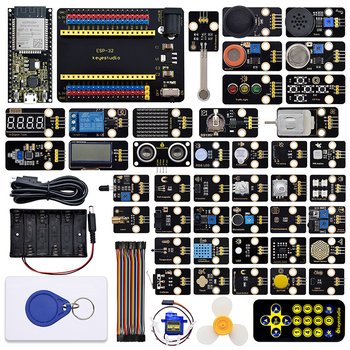
Keyestudio ESP32 42-in-1 Sensor Kit (with Board) (SKU KS5003). Supplier catalog listing; confirm the supplied variant, pack contents, availability and quotation before ordering.
Measure or detect a physical condition such as distance, light, temperature, motion, moisture, or orientation; feed readings into a microcontroller project.
Projects and applications
Examples include an obstacle-alert rover, room temperature monitor, light-activated lamp, soil-moisture display, or orientation logger. Select an example only when the exact sensor measures the condition you need.
Before choosing it, write down the project goal, expected environment, operating voltage, current demand, physical dimensions, required controller or driver, and any software or accessories needed.
Getting started
Identify the exact module and pin labels, confirm its operating voltage and interface from the supplier data sheet, then test one reading at a time. Some sensor outputs are 3.3 V only and must not be connected to 5 V logic without a suitable level shifter.
Available product specification
Keyestudio ESP32 42-in-1 Sensor Kit (with Board) (SKU KS5003). Supplier catalog listing; confirm the supplied variant, pack contents, availability and quotation before ordering.
What to check before use
- Confirm pinout, supply voltage, logic level, and interface against the exact model documentation.
- Disconnect power before rewiring; check polarity and avoid shorting adjacent pins.
- Keep the sensor within its rated environment and do not treat hobby sensors as certified safety or medical instruments.
Specifications and package contents can vary by model or supplier batch. Confirm the exact variant, datasheet, wiring diagram, and manufacturer instructions supplied with your item. If a rating or pinout is unclear, ask a qualified instructor or technician before powering it.
Related learning and support
Use the OmniDev Learning Hub to explore other product guides and tutorials. For help selecting parts for a build, contact the OmniDev team with the product name, model, and project goal.